Xbox 360 emulators: Difference between revisions
| Line 27: | Line 27: | ||
|{{Ya}} | |{{Ya}} | ||
|{{Green}} {{License|BSD3}} ({{License|Permissive}}) | |{{Green}} {{License|BSD3}} ({{License|Permissive}}) | ||
| rowspan="3" |{{Emulator compatibility|link=https://xenia-manager.github.io/compatibility| | | rowspan="3" |{{Emulator compatibility|link=https://xenia-manager.github.io/compatibility|175|1026}}<ref group="lower-alpha" name=canarycompat>The 'Playable' count reflects only those titles free of game-breaking bugs. [https://github.com/xenia-canary/game-compatibility/issues?q=state%3Aopen%20-label%3Agpu-occlusion-query%20-label%3Aapu-slow%20-label%3Akernel-threading-stalls%20-label%3Akernel-unimplemented-feature%20-label%3Akernel-save-file-errors%20-label%3Agpu-drawing-corrupt%20-label%3Agpu-shader-errors%20-label%3Astate-crash-guest%20-label%3Axam-input-problems%20-label%3Axam-live-signin-required%20-label%3Agpu-slow%20-label%3Agpu-driver-issues-nvidia%20-label%3Agpu-driver-issues-amd%20-label%3Astate-crash-host%20-label%3Astate-crash-xna-WONTFIX%20-label%3Astate-hang%20-label%3Agpu-drawing-missing%20-label%3Acpu-timing%20-label%3Aapu-garbage%20-label%3Atech-kinect-required%20-label%3Agpu-slow%20-label%3Acpu-jit-problems%20-label%3Aapu-silent%20-label%3Atech-avatar-required%20-label%3Astate-menus%20label%3Astate-gameplay Many other games] may reach gameplay but remain hindered by crashes, softlocks, or performance-halting issues.</ref>||{{~}} | ||
|- | |- | ||
|Xenia Canary Netplay | |Xenia Canary Netplay | ||
Revision as of 19:06, 17 June 2026

| |
| Original model Xbox 360 (2005) | |
| Developer | Microsoft |
|---|---|
| Manufacturer | Flextronics, Wistron, Celestica, Foxconn |
| Type | Home video game console |
| Generation | Seventh |
| Release date | November 22, 2005 |
| Discontinued | WW: April 20, 2016 |
| Predecessor | Xbox |
| Successor | Xbox One |
| Emulated | ~ |
- For emulators that run on the Xbox 360, see Emulators on Xbox 360.
The Xbox 360 is a seventh-generation console released by Microsoft on November 22, 2005, and retailed for $399 ($658 in 2026). It had a triple-core PowerPC Xenon CPU that ran at 3.2 GHz with 512 MB of RAM and an ATI Xenos GPU at 500 MHz. The console's life saw the option of a motion-sensing camera called the Kinect.
The Xbox 360 had a relatively strong modding scene (although hindered by the need to physically modify the console compared to the Xbox) and homebrew documentation of the console's GPU, file format, and various other APIs were performed early. Due to the system's complexity and PCs of the time lacking the necessary performance, emulation was slow to develop for this console compared to previous generations, with Xenia being the only serious option since 2013 and developing steadily since then.
Emulators


- ↑ 1.0 1.1 You can use this frontend (but it's Windows only. Use Wine if on Mac or Linux), which is easy 1-click download, setup and simple frontend for Xenia Canary fork including netplay and mousehook branches. Similarly to Xenia Edge, it brings numerous quality-of-life and UX improvements via the interface like override game index database (similar to other database-featured emulators), enabling quick fixes for QoL improvement for specific titles.
- ↑ The 'Playable' count reflects only those titles free of game-breaking bugs. Many other games may reach gameplay but remain hindered by crashes, softlocks, or performance-halting issues.
- ↑ Compatibility reports for the master version no longer maintained and can be considered as obsolete.
- ↑ https://x360mobile.com/#:~:text=46%25-,OF%20WHICH%20PLAYABLE,-EMULATION
Comparisons
- Xenia
- Xenia is the leading hybrid approach (utilizes very high-level emulation (HLE) approach for the CPU, while relying heavily on Low-Level Emulation (LLE) for the GPU[1][2]) Xbox 360 emulator that has made it the furthest. While it isn't nearly as compatible as RPCS3 is for PlayStation 3, impressive performance outshines RPCS3 due to RPCS3's extremely challenging SPU emulation resulting reasonably higher CPU demands. Due to its approaches and other reasons/optimizations (see high and low-level emulation#Future Outlook section), it is making Xenia more reliant on GPU performance instead of CPU (especially compared to RPCS3). But keep in mind that it still depends heavily on CPU single-thread performance due to graphics API-related calls and focusing solely average CPU utilization percentage numbers may give you false impression. So in summary: just like most other software emulators, CPUs with better single-threaded performance will give you better framerates than before (considering you're not hitting GPU bottleneck).
- aX360e is ported based on the arm64-backend branch of Xenia. It also incorporates most of the code from the Xenia Canary project, with dedicated optimizations tailored for the Android platform. Currently limited to a selection of games, actual game performance is dependent on your device's hardware capabilities, and most titles may not run at full speed.
- Canary fork compared to the master builds offer improved performance, it has experimental changes that may or may not work, but it also has more functions/tends to work better. On top of that, it has Linux builds[3] and some hardware features and enhancements are currently only available in this fork and its branches mentioned below. At this point they're separate, nothing is getting merged to master.
- Even though Xenia utilizes very high-level emulation (HLE) approach for the CPU, there was a Xenia Canary branch named "Xenia Nukernel" which tried to emulate; the six individual hardware threads on the original Xbox 360 CPU, certain kernel timing quirks (clock interrupt update every 1 millisecond, "background scheduling"), the kernel's thread scheduler, deferred procedure calls, asynchronous procedure calls (done more accurately than on Xenia, plus kernel ones are supported), much more accurate and portable emulation of synchronization primitives, supports guest objects without creating host objects for them. Nukernel was mostly focused on reimplementing parts of the kernel's threading subsystem, not io or memory, which are also messed up. Developer of this branch said that: "It really felt like starting from scratch on the kernel side, because for a long time nothing booted on it". However, this specific branch has been discontinued in 2024, but the future goal for the main Canary forks is to achieve proper thread management similar to what nukernel aimed to achieve, which is expected to help resolve many fundamental stability and timing issues. This transition is already underway, with the recent improvements of both Canary and Edge. See Virtualization and Resource Management section for more information about this approach.
- X360 Mobile; is built upon the codebase of Xenia Canary. According to devs statement: "We made the choice to keep X360 Mobile closed-source to prevent fraudulent forks, malicious repackaging (e.g., injecting adware/spyware into our builds), and to protect our proprietary ARM64 conversion pipeline and compiler optimizations. We want to ensure that users receive only secure, highly optimized, and officially signed packages directly from this repository or our official website."
- Canary Netplay; this branch is used for online play, see Xbox Live page Xbox 360 section for detailed information. Also supports system link support.
- Xenia Edge; this is a bleeding-edge experimental fork of the Xenia emulator, originally based on Xenia Canary branch. It has macOS builds, and the focus is on faster iteration, higher default game compatibility, usability and platform support. Unlike standard Canary builds, Xenia Edge includes a built-in frontend, which can be considered as better option to using Xenia Manager with Xenia Canary. It inherits all Canary features (such as the XAM profile manager), but it does not currently include Canary Netplay functionality. It brings numerous quality-of-life and UX improvements compared to Xenia Canary (e.g., XEX swapping simulation). Similar to Xenia Manager, it features an override game index database, enabling quick fixes for QoL improvement for specific titles. Relevant improvements are intended to flow back upstream over time.
- XeniOS; this branch is an experimental Apple-focused fork-currently based on Xenia Edge. It exists as a fast-moving place to develop, test, and ship iOS and macOS work while also carrying platform changes that benefit ARM64 Windows, Linux, and Android. Relevant improvements are intended to flow back upstream over time.
- Xenon
- Xenon is an LLE Xbox 360 emulator written in C++, so it has completely different approach for emulation compared to Xenia but this project will also provide better understanding and reverse engineering of the system and helps other projects similarly to PPSSPP and JPCSP situation. Currently only small programs work and
 boots xboxkrnl. See their discord channel for more information.
- Fission
- The official emulator on the Xbox One (X|S) and Xbox Series X/S consoles. There is no "Xbox Live Indie Game & XBLIG" support. Load times are faster, but emulation suffers from input lag due to forced v-sync. Beyond this, Fission supports some hardware features.
- Xbox One X and Xbox Series X further improve on the emulation with enhancements like better loading times, framerate, texture filtering, higher resolution and auto HDR in some games. Note that an Internet connection is required to download each game on its first run.
- However, with a November 2021 update Microsoft ended the program and said: "This latest and final addition of 70+ titles to the backwards compatibility program was only possible through the passion and feedback from the community," Microsoft said. "Your constant requests for specific titles and enhancements encouraged the Backwards Compatibility team to partner with the original creators to preserve thousands of games from over four generations of Xbox. While we continue to stay focused on preserving and enhancing the art form of games, we've reached the limit of our ability to bring new games to the catalog from the past due to licensing, legal and technical constraints. Thank you for being part of this journey with us."[4]
Enhancements
| Name | Xenia Canary | |
|---|---|---|
| Controls | Disguise peripheral support through passthrough Tricking the software into thinking that the original controller was connected even though they identify themselves with different device IDs. When a game tries to identify a connected 'nearly the same internally' controller, emulator will tell it that the equivalent original controller is connected instead, allowing it to work. |
? |
| Input lag mitigating | ✗ | |
| Mouse injector | ✓ | |
| Real peripheral support (passthrough) Ability to passthrough USB HID devices or Bluetooth adapter for emulated system. |
✓ | |
| Turbo button | ? | |
| Graphics | Aspect ratio hack 16:9 is already supported, but there is no support by system for render games in other aspect ratios such as 16:10, 21:9, and 32:9. |
✓ |
| Better texture filtering Enhancement option for providing better texture filtering methods comparing the original hardware had. |
✓ | |
| Pre-rendering anti-aliasing (SSAA, MSAA) |
✗ This enhancement feature shouldn't be confused with Xbox 360's native 2x/4x MSAA. | |
| Ray tracing (DXR, VRT and MRT) |
Implementing ray tracing in an emulator is unfortunately quite challenging and unlikely to be feasible in the near future. However, you can try "Screen-Space Ray Traced Global Illumination" shader using ReShade. Demonstration
| |
| Resizable internal resolution | ✓ | |
| RTX Remix | Implementing RTX Remix technology in an emulator is unfortunately quite challenging and unlikely to be feasible soon. You can use ReShade for post-processing. | |
| Super-resolution techniques (DLSS, XeSS and FSR 2+) |
Requires access to the depth buffer and temporal data like motion-vectors, so it is quite challenging and unlikely to be possible soon. | |
| Texture replacement | ✗[lower-alpha 1] | |
| Performance | Frame generation (LSFG, DLSS-FG and SM, XeSS-FG, AFMF and FSR FG) |
Implementing frame generation technology in an emulator is unfortunately quite challenging and unlikely to be feasible soon however post-processing techniques such as motion interpolation is quite possible. Input latency will be a crucial factor, but its impact likely varies depending on the specific technique used, it is recommended to use after applying the "Internal Framerate Hack". While AFMF or LSFG can be used with xenia, please be aware some visual glitches and artifacts may occur at this time.
|
| Internal frame rate hack | ✓ | |
| Overclocking | ✗ | |
| Preload optical disc image to RAM For users with sluggish multi-platter HDDs or plagued by horrible seek times, this enhancement might offer smoother experience, potentially reduced power consumption; it also shines when disc images reside on a network drive. Although keep in mind that preloading image would take some time, and it will require additional amount of RAM capacity. |
✗ | |
| Rendering latency reduction technologies (LatencyFleX, Reflex, Xe-LL and Anti-Lag+)
|
✗ | |
| Post-processing | AI-powered filter (Freestyle) |
? |
| Filters | ✗ | |
| Inverse tone mapping compatible | ? | |
| Post-rendering anti-aliasing (FXAA, TXAA and MLAA/SMAA) |
✓ | |
| Post-rendering scaling (Sharp bilinear, Lanczos and FSR 1) |
✓ | |
| Shader chain | ✗ You can use ReShade for this. | |
| Quality of life | Automatic emulated controller connect/disconnect Automatically connects or disconnects emulated controllers when a new or current controller is connected or disconnected. |
✗ |
| Automatic updater | ~ Canary branches have automatic update option. | |
| Big Picture Mode | ~ | |
| Built-in cheat manager | ✗ | |
| Built-in custom resolution/CRTSwitchRes For using this on Windows, you need CRT Emudriver. Another option is using EDID editor tool such as "Custom Resolution Utility". |
✗ | |
| Built-in mod editor and manager | ✗ | |
| Built-in patch manager | ✗ | |
| Built-in save manager | ✗ It has no GUI or manager for virtual disk content (xenia automatically creates a directory for emulated HDD), neither Xbox 360 Memory Card emulation capability. | |
| Capable image format support | ✓ (.xiso supported) | |
| Command-line options | ✓ | |
| Index/Compatibility databases Many modern emulators incorporate database-driven per-game overrides to apply targeted fixes or tweaks for quality-of-life (QoL) improvement without requiring users to manually edit global config files for each title. This approach allows quick, centralized application of workarounds for specific games, such as graphics fixes, timing adjustments, or compatibility flags, while keeping the emulator's default settings intact. This auto fix feature shouldn't be confused with "Per-game profiles" enhancement feature. |
~ Xenia Edge fork and Xenia Manager frontend supports this feature. | |
| Pause/Resume emulation | ✗ | |
| Per-game profiles | ~ Using per-game setting for each game in Xenia requires creating a separate "xenia.config.toml" file for each one and launching them manually through a batch script or command line. Another option is using Xenia Edge or Xenia Manager. | |
| Portable and stealth Useful enhancement feature for non-personal computer use or plug-and-play scenarios. However, the software may still require the necessary prerequisites and dependencies for your operating system if it is not statically linked. |
✓ | |
| SDL backend support Provides controller plug-and-play and automatic input mapping through SDL GameController database. |
? | |
| Streamable compression format | ✓ | |
| Variable refresh rate compatible | ✓ | |
| TAS features | Fast forward/Turbo speed | ✗ |
| Macros/Scripts/Lua | ✗ | |
| Movie recording/playback | ✗ | |
| Rewind | ✗ | |
| Save states/Snapshots | ✗ | |
| Misc. | Ambient sounds simulation Simulation of audio from original hardware and environments, such as mechanical hard drive, floppy diskette, and optical drive noises (e.g., head seeks, spin-up/down, tray loading, disc spinning, and clicking), variable CRT flyback transformer whine (the classic high-pitched "coil whine" that dynamically changes pitch based on screen brightness and content), arcade cabinet effects (e.g., fan hum or button rattles), and other background ambient noises. |
✗ |
| Audio filters and presets Simulation of characteristic playback limitations and coloration of vintage consumer audio hardware, such as CRT television speakers, arcade cabinets, handheld consoles, early PC sound outputs, and low-fidelity integrated speakers. These filters are not intended to be perfectly accurate recreations, but rather to evoke the tonal qualities, distortion, bandwidth limits, resonance, and compression associated with 8-bit and 16-bit era devices. Examples include mono or narrow stereo output, reduced frequency response, speaker cone distortion, mild saturation, aliasing, and preset lo-fi profiles inspired by classic TVs, portable game systems, radios, and retro multimedia hardware. |
Exclusive to libretro cores at the moment. | |
| Debug features | ~ Xenia has debugger, but there is no documentation, and it is tough to understand how it works. See xenia discord dev channel for more information about debugging. | |
| EmuVR support | Exclusive to libretro cores. So there is no support at the moment. | |
| File browser Lets the user look at the ROM's internal files. |
✗ | |
| Free Look Free Look is an enhancement feature that allows manipulation of the in-game camera. |
While freecam would be technically possible, it will require per-game patches. Said patches would require a significant amount of time to reverse the game's engine, which means that only someone talented with enough dedication to a single game could do it. | |
| RetroAchievements | ✗ | |
| Rich Presence (RPC) Allows the emulator to share real-time game session details (e.g., current game title, level, boss, playtime, or custom status) with external applications. This enables features such as displaying what you're playing on your profile, inviting friends to spectate, or triggering join-in-progress functionality where supported. |
✓ | |
| Screen translator Using optical character recognition (OCR) and other techniques, this feature can provide live translation of in-game text, text-to-speech for visually impaired users, and more — either on demand or automatically. |
You can use RetroArch's AI Service or the standalone offline bquenin's Interpreter. | |
Hardware features and peripherals
| Name | Xenia Canary | |||
|---|---|---|---|---|
| Hardware features | Alternative display modes | ✓ | ||
| Connectivity | Ethernet | ~ | ||
| IR receiver | ✗ | |||
| Wi-Fi | ✗ | |||
| Xbox Live (incl. Game Room) |
~ | |||
| Controller vibration | ✓ | |||
| Dolby Digital and 5.1 Dolby Pro Logic II |
✓ | |||
| DVD drive | ✗ | |||
| Flash memory | ? | |||
| Xbox 360 system software | Achievements Not to be confused with RetroAchievements. |
~ | ||
| Dashboard and apps | ~ | |||
| Xbox emulation (Fusion) | ✗ | |||
| Xbox Live Arcade (XBLA) | ✓ | |||
| Xbox Live Indie Games (XBLIG) | ✗ | |||
| Peripherals | Camera | Kinect | ✗ | |
| Xbox Live Vision | ✗ | |||
| Controllers | Big Button Pad | ✗ | ||
| Chatpad | ✓ | |||
| DJ Hero turntable | ~ Passthrough support only, no emulation support. | |||
| Drums and guitars | ✗ | |||
| Fishing controllers | Rapala Rod and Reel (Rapala Pro Bass Fishing) | ✗ | ||
| Rod and Reel (Bass Pro Shops: The Strike) | ✗ | |||
| Light gun | Top Shot Elite | ✗ | ||
| Top Shot Fearmaster | ✗ | |||
| Rock Band 3 MIDI Pro Adapter | ✗ | |||
| uDraw GameTablet | ~ | |||
| Wireless Racing Wheel | ✗ | |||
| Headset | ? | |||
| HD DVD player | ✗ | |||
| Karaoke microphone | ✗ | |||
| Keyboard | ✗ | |||
| Mouse | ✗ | |||
| Stereoscopic 3D | ✓[lower-alpha 1] | |||
| Storage | External USB mass storage device | ✗ | ||
| Xbox 360 Hard Drive | ~ | |||
| Xbox 360 Memory Card | ✗ | |||
| Toys-to-life | Disney Infinity Base | ✗ | ||
| LEGO Dimensions Toy Pad | ✗ | |||
| Skylanders Portal of Power | ~ | |||
| Xbox 360 Media Remote | ✗ | |||
| Xbox SmartGlass | ✗ | |||
| Misc. | Development kits | ~ | ||
| Disc scratch Similarly to cartridge tilting on cartridge-based systems, people intentionally scratch their discs to make a particular glitch work more reliably. |
No emulator currently includes built-in disc scratch simulation, as it would require low-level emulation of optical drive error correction, which is not implemented. As a workaround, you can try the external Real-Time Corruptor (RTCV) tool. It is a real-time memory/data corruption tool for inducing glitches during emulation, which might mimic some effects of a scratched disc (e.g., visual/audio artifacts or crashes). However, it is not a true "disc scratch" simulator, as it works on live memory rather than simulating physical disc read errors. | |||
| Power light | ✗ | |||
Dashboard and apps


- tcrf: Xbox 360 Dashboard revisional differences
- se7ensins: Complete History Of Xbox 360 Dashboard Updates
- Wikipedia - List of Xbox 360 applications
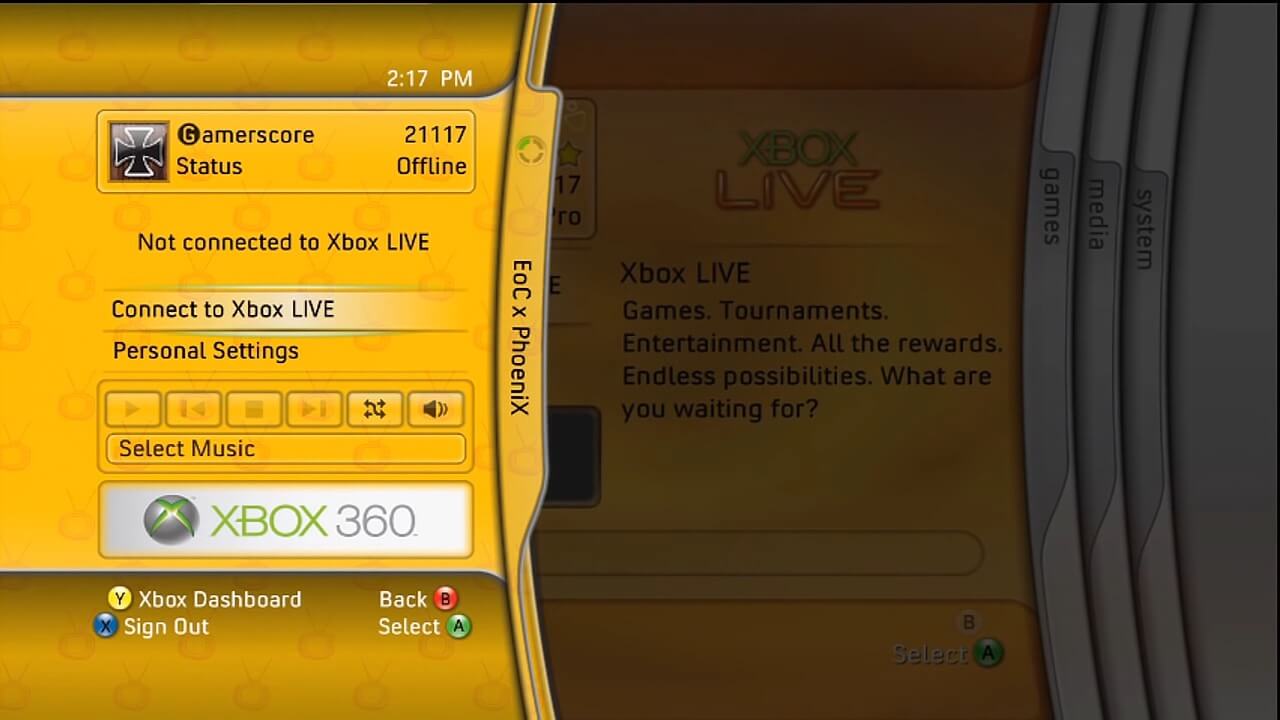
The Xbox 360 Dashboard is the console's primary graphical user interface (GUI), serving as a central hub for launching games and applications. Throughout its lifecycle, the interface underwent several major revisions, the UI transitioned from the original "Blade" design to tile-based layouts, most notably the "New Xbox Experience" (NXE) and Metro-style updates introduced various social and multimedia features. The Dashboard features robust support for media streaming, allowing users to access music, photos, and videos directly from a PC (using Windows XP MCE). This is facilitated through the console’s built-in Windows Media Center Extender (Version 2) functionality. This integrated version should not be confused with the standalone Media Center Extender hardware devices or the Version 1 add-on used for the original Xbox. Later revisions of the Dashboard introduced Avatars, customizable 3D personas representing the player, similar to the Nintendo Wii's Mii system.
- Xenia Canary supports dashboard emulation, see here, here and here. Xbox 360's Xbox Guidedashmenu is not emulated at the moment. XAM's profile manager emulation via Xenia UI is possible for canary and its branches. Various other system functions have been stubbed through community efforts, with partial progress in some areas. Nevertheless, support for many system functionalities remains insufficient. Xbox 360 doesn't have a "bios", at least not one that's similar to something like most other systems. The dashboard, kernel, guide stuff is located in the nand (virtual device is Flash:), as its own executables of sorts. That's the system files, and does everything. As many times the devs mentioned, Xenia has its own kernel built in that mimics what Xboxkrnl and XAM does, to avoid requiring system files from a Xbox 360 to work, so devs built the bare minimum of the kernel functions so some stuff would "work". That also means that a lot of functions are unimplemented, thats why so much kernel stuff is overlooked upon, since games dont need much of it, and dashboard doesnt work properly natively in xenia so they dont necessarily need to be implemented anyway. A consequence of that is that the HLE implementation of the kernel, is; minimal, and wasnt meant to handle more serious tasks like the overlay (Xbox Guide dash menu) running in the background and each and every guide-related file, and that's another reason that Xenia cannot use the original Xbox 360 UI (XUI), since XUI functions are unimplemented and Xenia uses imgui instead to handle stuff like message boxes, errors, dialogs, text boxes, etc that would otherwise be using one of the many executables found in the system files. Then, it depends on some API (not sure) to render the boxes themselves, and multiple XEXs running in the background at once, swapping XEXs in real time, and then you realize just how much work is required to get JUST the "Xbox Guide dash menu" working... and SO much more stuff that we didnt cover in this message. That's just scratching the surface basically.[5] Xenia Canary has basic support for XMP (Xbox Music Player) features, primarily focused on in-game music playback. Custom/user-provided music (e.g., from a virtual or physical Xbox 360 music library) is not supported yet. See here. Only music embedded within games or accessed through in-game mechanisms works at this stage. VFS (Virtual File System) implementation is kept as minimal/basic as possible. Notably, XAM does not enumerate files using a virtual/emulated device in the same way as real hardware. Instead, it relies on the host content directory (typically the content folder) for all file operations. This means dashboard/apps features involving file browsing, media library access, or external content loading are limited or non-functional beyond what's directly handled via the host path. See File System Abstraction section for more information about this. While a massive amount of community and developer effort over the last few years went into writing these minimal HLE stubs and implementations, development has recently shifted toward rewriting the XAM module using a LLE approach. By loading the original XAM module directly, this transition provides a much smoother development path and drastically improves overall emulation accuracy. In the future, this ongoing LLE implementation could potentially resolve these long-standing architectural bottlenecks such as running multiple background XEXs, implementing native XUI rendering, and enabling deeper VFS/XAM device file routing, finally paving the way for proper Xbox Guide and fully functional dashboard and other system features emulation. For the most up-to-date technical details, discussions, and potential future improvements (e.g., deeper VFS/XAM device emulation), check the dedicated Xenia Discord channel.
- You can always use user batch scripts that automate the Xbox 360 Slim (S model)'s iconic touch-sensitive "chime" or "ping" sound when turning on or ejecting a disc simulation, boot animation, dashboard loading and game selection process, aiming streamline the process until this feature request implemented.
- Keep in mind that you can emulate various Kiosk discs for Xbox 360 such as "Xbox 360 Retail Kiosk Disc 1.0" for experiencing "Blade" interface. Another alternative is using compilation discs such as "Xbox Live Arcade" for "Blade" interface and "Xbox Live Arcade Game Pack" for "New Xbox Experience" interface. However, these kiosk and compilation discs are only partially compatible with Xenia so don't expect perfect experience; see Interactive Kiosk page for more information.
- Doritos Crash Course, Full House Poker, various Xbox Live Indie Games, and other games that use your Xbox 360 avatar are mostly incompatible with the main builds. While full support is not yet integrated, there has been significant progress toward avatar emulation: PR #768 and work-in-progress experimental builds represent the initial major steps toward functionality. If you are not using the specific experimental builds mentioned above, attempting to access avatar editors or related menus will result in a softlock. On top of that, profiles created directly within Xenia Canary lack the necessary avatar data, and for any avatar rendering to function, users must currently use profiles generated on and dumped from physical Xbox 360 hardware (require a specific local directory to store and pull the necessary assets for proper avatar rendering and data management) because randomly generated avatars are not yet implemented (though support is planned).
- Xenia-Canary partially support real-time XEX (executable) swapping/switching for the titles with multiple executables: when a game attempts this, Xenia creates a "launch_data.bin" file. However, the emulator cannot currently boot the new executable automatically. To continue gameplay, close Xenia Canary completely and Relaunch Xenia Canary. The emulator will detect the launch_data.bin file and automatically boot the correct XEX to resume your progress. For a more seamless experience, consider using Xenia Edge. It features enhanced window and interface management, allowing for much smoother transition handling without manual restarts.
- Fission only supports Xbox 360's Xbox Guide dash menu, Friends/Party and Notifications, other than that, there is no Dashboard interface emulation whatsoever. Some Xbox 360 apps supported (Xbox One and Series X/S apps) on the newer consoles though.
System Link
Offline multiplayer gaming on the Xbox 360 home console over a LAN (local area network) multiplayer games, just like LAN tunneling for PlayStation systems. Over time, most private game servers have been shut. However, computer programs such as XBSlink, SVDL and XLink Kai allow users to play multiplayer for LAN supported games by using a network configuration that simulates a worldwide LAN.
- Xenia has no support for system link at the moment. But Xenia Canary fork Netplay branch supports most of the system link titles, see this page for more information. Netplay branch supports XLink Kai as well, but it is still experimental and limited to matches between other Xenia users. Sessions between Xenia users and Xbox 360 users isn't yet possible, see Xlink Kai: Xenia Support page.
- Fission supports System Link. See Xbox 360 System Link compatible games for Xbox One and compatible games for Xbox Series S/X.
- See Netplay#Local Multiplayer.
Achievements
Xenia Canary and its branches offers support for Xbox 360 achievements. These are the feature and pull requests for implementing the saving and restoring of unlocked achievements in the next session. A graphical user interface for viewing achievements has been implemented as well.
- For activating notifications for achievements and using original Xbox 360 sound and font you can use Xenia Edge's GUI, otherwise you need to change settings from "xenia-canary.config.toml" or "xenia-canary-netplay.config.toml";
- [UI]
- show_achievement_notification = true
- custom_font_path = "C:\\Users\\USERNAME\\AppData\\Local\\xenia-canary\\YOURFONTNAME.tff"
- [General]
- notification_sound_path = "C:\\Users\\USERNAME\\AppData\\Local\\xenia-canary\\YOURSOUNDFILENAME.wav"
- See Xbox Live page for connecting your Xenia Canary Netplay profile to the "Xenia WebServices web API" for the achievement progress.
DVD Drive
- free60: Xbox 360 DVD Drive
- consolemods: XGD3 games
- redump: Microsoft Xbox and Xbox 360 Dumping Guide
The Xbox 360 uses a 12x DVD drive with transfer speeds at 16MB/second. Xbox 360 DVD drive supports Audio CD, PhotoCD, DVD-Audio, DVD-Video and XGD3 discs. Optical disc drives for PCs usually aren't capable to read XGD3 discs. More info in ripping games section and reverse-engineering section. For reading HD-DVD discs you need #HD-DVD Player peripheral/drive.
- xenia has no support for Audio CD, PhotoCD, DVD-Audio, DVD-Video or Xbox 360 format DVD-ROM/XGD3.
- Xbox One and Xbox Series consoles (Fission) have support for DVD-Video, but there is no real support for Xbox 360 format DVD-ROM/XGD3, because it is only recognizing the disc, after that it is downloading/installing the game from Xbox Live not from the disc itself.
- See this dedicated page for more information about home media playback support for emulation software.
- See "Emulation of the Disc Drive" section in Copy protection page.
Xbox Live Indie Games (XBLIG)
- xenia emulator has no support for XBLIG and unlikely to be feasible soon.
- Fission has no support for XBLIG.
- A dev over on the subreddit recently shared a working proof-of-concept for a dedicated XBLIG emulator.
Stereoscopic 3D
See this page for a list of Xbox 360 games that support stereoscopic 3D.
- Main article: Virtual reality#Emulators with VR support
Peripherals
Kinect
The Kinect was Microsoft's version of the EyeToy, a camera that also doubled as a motion tracker and microphone capable of detecting gestures and voices to play games without a controller. This was in contrast to the Wii with its Wiimote and the PS3 with its PlayStation Move. Despite getting native support on Windows, users have made open-source drivers for it.
- Xenia doesn't currently have any support for the Kinect. But you can use No Kinect Patch for Sonic Free Riders. There are also experimental efforts based on the Canary branch, to implement Kinect emulation using a webcam, but this feature is still a work in progress.
- There is a project called KinectFaker for emulating a Kinect Device (Version 1/xBox360) with Skeleton Tracking. The Kinect Toolkit provides a program, called Kinect Studio, which is able to record and play Skeleton Animations. Sadly, the Kinect Studio program works only on a PC with a connected Kinect Device. This emulator enables testing of Kinect applications without connected Kinect or Kinect runtime by reading skeleton animation files. Currently, only a self defined file format (defined with protobuf) is used and must be recorded first.
HD DVD Player
- Xenia has no HD-DVD support at the moment.
- Xbox One and Xbox Series consoles has no support for HD-DVD.
- See this dedicated page for more information about home media playback support for emulation software.
Xbox 360 Media Remote
Just like PlayStation 2's DVD Remote Controller and PlayStation 3 Blu-ray Disc remote, you can even play games with this remote other than multimedia along with being able to navigate the dashboard functionalities. The remote control allows for controlling portions of the Xbox 360 interface via infrared.
Emulation issues
[Xenos] was a playground for experiments — it was developed near the end of the Direct3D 9 era, but still before Direct3D 10, and contained many features not standardized or even available at all on the PC, but when they ended up on the PC, the actual implementation could be significantly different; it also included completely unique features. […] Contrarily to a common misconception, the Xbox 360 [isn't] just a “DirectX 9 box.” It essentially contains a [tile-inspired] mobile-like GPU with much more raw power than a comparable mobile GPU. If you compare the registers of the Xenos and the Qualcomm Adreno 200, you can see that most of them are the same, as they are almost the same GPUs — the Adreno 200 was called the AMD Z430 before having been acquired by Qualcomm and was even referred to as the "mini-Xenos"!"
-Triang3l[6]
Despite being one of the most popular seventh gen home console, due to requiring many resources as well as the hardware not being properly documented yet[7], Xbox 360 emulation development has unfortunately lost momentum in recent years, with updates becoming less frequent. That, plus the fact that Microsoft's own implemented official emulation (Fission) of the system through the Xbox One and Series S/X ended with a November 2021 update. Fortunately, Xenia is making slowly but surely progress on that front.
I wouldn't say that Xenia has developers, we're just a bunch of community members with enough skills to do something. […] It is easier to slowly fix the emulator than write GUI, and I personally prefer having more games working than GUI.
-Gliniak
For more information about Xbox 360 system and its reverse engineering;
- Rodrigo Copetti: Xbox 360 Architecture Analysis
- Xenon Wiki
- XenonLibrary
- consolemods: Xbox 360
- Free60 Wiki
- emoose: xbox-reversing - Information & parsers for some under-documented Xbox360 structures/file formats (STFS/GDFX/XDBF/XEX...)
- libfreenect - Drivers and libraries for the Xbox Kinect device on Windows, Linux, and OS X.
- rexdex: recompiler and references list
- XenonRecomp and XenosRecomp
- I Code 4 Coffee - Ryan Miceli: Hacking the Xbox 360 Hypervisor Part 1: System Overview
- InvoxiPlayGames: research and reverse engineering notes/utilities relating to the Xbox 360
- Discord: Xenon and Xenia (For general and development discussions about Xbox 360 emulation)
- Mesa gallium R300~R500
- Specs are the most Xenos related in terms of registers; the closest is the Adreno 200 registers from Qualcomm's Code Aurora Forum release (that
drivers/mxc/amd-gpu/yamatodirectory in some Linux kernel forks). For the shader unit though, there are various specification versions in the exhibits at https://portal.unifiedpatents.com/ptab/case/IPR2015-00325 but they all are very preliminary. Many shader instructions are documented at http://web.archive.org/web/20100423054747/http://msdn.microsoft.com:80/en-us/library/bb313877.aspx but without the encodings. Also http://fileadmin.cs.lth.se/cs/Personal/Michael_Doggett/talks/unc-xenos-doggett.pdf for texture formats. https://www.slideshare.net/blackdevilvikas/next-generation-graphics-programming-on-xbox-360 for tessellation. R600 has some similarities, but it's more for conceptual referencing rather than copying and pasting. - Open-Source "Terakan" Vulkan Driver For Radeon HD 6000 Series Shown On Windows - Vitaliy Kuzmin "Triang3l": TeraScale GPUs working on Vulkan and leveraging the Mesa codebase.
- Aleksandra Uvarova: Realm of gaming experiments: potential developer errors in emulator creating
- Microsoft Xbox Live docs
- Xbox Connected Storage Manager - Accessing games using Xbox Live's save data requires authorization for the 'TitleStorage' service. This requires a device authenticated token and user token. However, the device token originally went through a Microsoft SOAP-based stage which required more effort than it was worth. Instead, using the 'wincred' storage was helpful as this is where the relevant Gaming Services on Windows caches tokens. This application to make the process more clean and easier.
- MVG: Xbox 360 Emulation on the PC with Xenia takes a huge step forward, Why Microsoft switched from Intel to Power PC for the Xbox 360, The Story of Xbox 360 PartnerNet Game Leaks, How a Mini drill tool defeated security on the Xbox 360, How the Xbox 360 Hypervisor Security was Defeated, Why YOU need a Modded Xbox 360 in 2018, The Xbox 360 is still awesome in 2019, Xbox 360 Blades Dashboard, MVG: Any Xbox 360 can now be hacked with just a USB Flash Drive
- Digital Foundry: Xbox Series X: Auto HDR Mode Tested - What Works and What Doesn't, FPS Boost For Xbox 360 Games, Xbox Series X Backwards Compatibility Tested
- Feature tracker: Vulkan-based GPU emulation implementation. Also see this discord conversation if you're interested in Vulkan backend for Xenia.
See also
External links
References
- ↑ Rick's xenia discord message about LLE and HLE
- ↑ chrispy's comments about xenia's approach
- ↑ For more information about Xenia emulation on Linux, Android or macOS, see this page.
- ↑ https://www.gamespot.com/articles/xbox-backwards-compatibility-adds-70-more-games-today-as-microsoft-ends-the-program/1100-6498021/
- ↑ seven7000's discord message about Xenia and dashboard emulation
- ↑ Triang3l (April 27, 2021). Leaving No Pixel Behind: New Render Target Cache, 3x3 Resolution Scaling & Three Years in Xenia’s GPU Emulation. Xenia.
- ↑ Building an Xbox 360 Emulator