MelonDS: Difference between revisions
added Switch port and updated description |
→Downloads: +WideMelon |
||
| (98 intermediate revisions by 44 users not shown) | |||
| Line 1: | Line 1: | ||
{{lowercase title}} | {{lowercase title}} | ||
{{Infobox emulator | {{Infobox emulator | ||
|title = melonDS | |title = melonDS | ||
|logo = MelonDS.png | |logo = MelonDS.png | ||
|logowidth = 80 | |logowidth = 80 | ||
|version = {{ | |version = *{{Version|MelonDS}} <small>(Desktop)</small><br /> | ||
|active = Yes | *{{Version|MelonDSAndroid}}<small>(Android)</small> | ||
|platform = Windows | |active = Yes | ||
|target = [[Nintendo DS emulators|Nintendo DS]] | |platform = [[Emulators on PC|Windows]]<br/>[[Emulators on Linux|Linux]]<br/>[[Emulators on macOS|macOS]]<br/>[[Emulators on BSD|BSD]]<br/>[[Emulators on Android OS|Android]]<small> (Unofficial)</small><br/>[[Emulators on Switch|Nintendo Switch]]<small> (Unofficial)</small><br/>[[Emulators on Vita|PlayStation Vita]]<small> (Unofficial)</small> | ||
|developer = [https://github.com/ | |target = [[Nintendo DS emulators|Nintendo DS]]<br/>[[Nintendo DSi emulators|Nintendo DSi]] | ||
| | |developer = [https://github.com/Arisotura Arisotura]<br/><small>[https://github.com/Arisotura/melonDS/graphs/contributors Repository contributors]</small> | ||
|website = [http://melonds.kuribo64.net/ melonds.kuribo64.net] | |accuracy = Medium-Accurate | ||
|support = [https://www.patreon.com/staplebutter Patreon] | |website = [http://melonds.kuribo64.net/ melonds.kuribo64.net] | ||
|source = [https://github.com/ | |support = [https://www.patreon.com/staplebutter Patreon]<br/>[https://paypal.me/Arisotura PayPal] | ||
|prog-lang = {{Proglang|C}}, {{Proglang|C++}} | |||
|license = {{license|GPLv3}} | |||
|source = [https://github.com/Arisotura/melonDS GitHub] | |||
|issuetracker = [https://github.com/melonDS-emu/melonDS/issues GitHub] | |||
|bios = [[Emulator_Files#Nintendo_DS_.2F_DSi|Required for DSi]] | |||
}} | }} | ||
'''melonDS''' is a | |||
'''melonDS''' is a free and open-source [[Nintendo DS emulators|Nintendo DS]]/[[Nintendo DSi emulators|DSi emulator]] aiming for better performance than [[DeSmuME]] and to emulate Wi-Fi and local multiplayer capabilities. Its developer is Arisotura (formerly known as StapleButter/Luigi__), a former contributor to DeSmuME, and it is available as a [[libretro]] core since version 0.6. Its first commit on GitHub was on May 15, 2016. | |||
==Downloads== | ==Downloads== | ||
{| cellpadding="4" | |||
|- | |||
|{{Icon|Win|Lin|Mac|LinuxARM|WoA|FreeBSD|OpenBSD|NetBSD}} | |||
|'''[http://melonds.kuribo64.net/downloads.php Official Builds]'''<br/><small>Also available on [https://github.com/Arisotura/melonDS/releases Github]</small> | |||
|- | |||
|{{Icon|Win|Lin|Mac}} | |||
|'''[https://github.com/Arisotura/melonDS/actions Dev Builds]''' | |||
|- | |||
|{{Icon|Win}} | |||
|'''[https://github.com/ZironZ/melonDS/releases melonDS X432R+ fork]''' — melonDS with upscaled 2D graphics and textures. | |||
|- | |||
|{{Icon|Win|Lin|Mac}} | |||
|'''[https://github.com/pruefsumme/widemelon/releases WideMelon]''' — Experimental widescreen build of melonDS that expands DS 3D viewports while keeping 2D layers and the touchscreen at native proportions. | |||
|- | |||
|colspan="3"|<hr/> | |||
|- | |||
|align=center|{{Icon|Android-big}} | |||
|'''[https://github.com/rafaelvcaetano/melonDS-android Source]''' '''[https://play.google.com/store/apps/details?id=me.magnum.melonds Play Store]''' <br/> Unofficial melonDS Android port | |||
|- | |||
|align=center|{{Icon|Android-big}} | |||
|'''[https://github.com/SapphireRhodonite/WatermelonDS WatermelonDS]''' <br/> Unofficial fork of melonDS-Android with dual-screen/external display support | |||
|- | |||
|colspan="3"|<hr/> | |||
|- | |||
|align=center|{{Icon|NX-big}} | |||
|'''[https://github.com/RSDuck/melonDS/releases Release 6]<br>[https://gbatemp.net/threads/melonds-for-switch-continuation.570021/ GBATemp Thread]'''<br><small> Ported by Hydr8gon, and currently maintained by Generic (aka RSDuck), who added an ARM64 JIT and other improvements. (Unofficial)</small><!--I don't know what the current status is for the Switch Port in termsuuuuu of compatibility--> | |||
|- | |||
|align=center|{{Icon|Vita}} | |||
|[https://github.com/Rinnegatamante/melonDS-Vita Vita port]<br><small>No longer maintained</small> | |||
|} | |||
==Overview== | |||
As of 0.9.5, melonDS offers: | |||
* Nearly complete core (CPU, video, audio...) | |||
* JIT recompiler for fast emulation | |||
* OpenGL renderer, 3D upscaling | |||
* RTC, microphone, lid close/open | |||
* Joystick support | |||
* Savestates | |||
* Many display position/sizing/rotation modes | |||
* Wi-Fi: local wireless and online networking | |||
* DSi emulation | |||
* Camera support (DSi only) | |||
* DLDI | |||
* (WIP) GBA slot add-ons | |||
...and more are planned. | |||
Though it is not as mature as DeSmuME in some areas, it is a relatively simple emulator to use and has potential. | |||
==Cheats/BIOS/Tutorials== | |||
* <B> [https://gbatemp.net/threads/deadskullzjrs-nds-cheat-databases.488711 Cheats Database]</B> | |||
* <B> [https://archive.org/details/ds-firmware_dsi-nand-and-firmware DSi NAND/BIOS + Firmware]</B> | |||
* <B> {{YouTubeVideo|-s2qEJFU8fM|DSi Tutorials}}</B> | |||
==Issues== | ==Issues== | ||
Like most emulators, development has been rocky with at one point the sole developer putting the project on a [http://melonds.kuribo64.net/comments.php?id=42 hiatus in May of 2018] leaving this [http://melonds.kuribo64.net/comments.php?id=43 to-do list] for anyone who wished to contribute improving the emulator, which is still open-source. [http://melonds.kuribo64.net/comments.php?id=44 On July 2018] it was announced that development was going to continue for melonDS and has since shown potential. | |||
There is very little to tweak in terms of improving performance (which can be a good or bad thing). This is mainly due to the developer's goal of accurate emulation rather than providing game-specific hacks. | |||
==Getting | The OpenGL renderer is still being worked on, meaning that there is a small chance some models/textures may not render correctly. | ||
==melonDSi== | |||
On October 15, 2019, Arisotura released [http://melonds.kuribo64.net/comments.php?id=103 the beta version of an emulator called melonDSi], an experimental melonDS branch for DSi emulation. It used to require a lot of files to be dumped to work (most of which were console-unique), but it has been reworked to require less files (namely, the DSi ARM7 and ARM9 BIOS, the DSi Firmware and a NAND dump). It has since been merged into the master branch and is available on melonDS 0.9. | |||
==Getting started== | |||
From the README on GitHub: | From the README on GitHub: | ||
:'' | :''Firmware boot (not direct boot) requires a BIOS/firmware dump from an original DS or DS Lite. DS firmwares dumped from a DSi or 3DS aren't bootable and only contain configuration data, thus they are only suitable when booting games directly.'' | ||
:'''''Possible firmware sizes''''' | |||
:*''128KB: DSi/3DS DS-mode firmware (reduced size due to lacking bootcode)'' | |||
:*''256KB: regular DS firmware'' | |||
:*''512KB: iQue DS firmware'' | |||
:''DS BIOS dumps from a 3DS can be used with no compatibility issues. DSi BIOS dumps should be | :''DS BIOS dumps from a DSi or 3DS can be used with no compatibility issues. DSi BIOS dumps (in DSi mode) are not compatible. Or maybe they are. I don't know.'' | ||
:''As for the rest, the interface should be pretty straightforward. If you have a question, don't hesitate to ask, though!'' | |||
These files can be found [[Emulator_Files#Nintendo_DS_.2F_DSi|here]]. If you do choose to look elsewhere online for system files, be warned that there are old hacked dumps floating around that breaks if the WFC configurations are altered. | |||
To use the OpenGL renderer, you must have at least OpenGL 3.1. | |||
More information can be found [http://melonds.kuribo64.net/faq.php in this FAQ]. | |||
To use melonDS in DSi mode, you need extra files which can be found [[Emulator_Files#Nintendo_DS_.2F_DSi|on this page.]] | |||
==System requirements== | |||
{{Main|Computer specifications#Recommended Specifications}} | |||
==Gallery== | |||
<gallery> | |||
Metroid2X.png|Top: 2x the native resolution without OpenGL. <br>Bottom: 2x the native resolution with OpenGL | |||
Chibi4x.png|Top: Native software render. <br>Bottom: 4x the native resolution with OpenGL | |||
</gallery> | |||
<!--==References== | |||
<references/>--> | |||
==External links== | |||
* [https://emucross.com/the-one-that-flourished/ The One That Flourished: A Look at melonDS 0.8] (By [[Dolphin]] tester [https://dolphin-emu.org/blog/authors/JMC47/ JMC47], aka Justin M. Chadwick. 6 June 2019.) | |||
* [https://discord.gg/pAMAtExcqV Official Discord server] | |||
* [https://melonds.kuribo64.net/board/ Official forums] | |||
*[https://kiwiirc.com/client/irc.badnik.zone/melonds IRC] | |||
{{Nintendo DS emulators}} | |||
[[Category:Emulators]] | [[Category:Emulators]] | ||
[[Category:Console emulators]] | |||
[[Category:Handheld console emulators]] | |||
[[Category:Windows emulation software]] | [[Category:Windows emulation software]] | ||
[[Category:Linux emulation software]] | [[Category:Linux emulation software]] | ||
[[Category:macOS emulation software]] | |||
[[Category:BSD emulation software]] | |||
[[Category:Android emulation software]] | |||
[[Category:Switch emulation software]] | |||
[[Category:PlayStation Vita emulation software]] | |||
[[Category:Nintendo DS emulators]] | [[Category:Nintendo DS emulators]] | ||
[[Category:Nintendo DSi emulators]] | |||
[[Category:Active emulation software]] | |||
Latest revision as of 09:39, 15 September 2026

| |
| Developer(s) | Arisotura Repository contributors |
|---|---|
| Latest version | |
| Active | Yes |
| Platform(s) | Windows Linux macOS BSD Android (Unofficial) Nintendo Switch (Unofficial) PlayStation Vita (Unofficial) |
| Emulates | Nintendo DS Nintendo DSi |
| Accuracy | Medium-Accurate |
| Website | melonds.kuribo64.net |
| Support ($) | Patreon PayPal |
| Programmed in | C, C++ |
| License | GPLv3 |
| Source code | GitHub |
| Issue tracker | GitHub |
| BIOS/Keys | Required for DSi |
melonDS is a free and open-source Nintendo DS/DSi emulator aiming for better performance than DeSmuME and to emulate Wi-Fi and local multiplayer capabilities. Its developer is Arisotura (formerly known as StapleButter/Luigi__), a former contributor to DeSmuME, and it is available as a libretro core since version 0.6. Its first commit on GitHub was on May 15, 2016.
Downloads
[edit | edit source]       
|
Official Builds Also available on Github | |
|
|
Dev Builds | |
|
|
melonDS X432R+ fork — melonDS with upscaled 2D graphics and textures. | |
|
|
WideMelon — Experimental widescreen build of melonDS that expands DS 3D viewports while keeping 2D layers and the touchscreen at native proportions. | |

|
Source Play Store Unofficial melonDS Android port | |
|
|
WatermelonDS Unofficial fork of melonDS-Android with dual-screen/external display support | |

|
Release 6 GBATemp Thread Ported by Hydr8gon, and currently maintained by Generic (aka RSDuck), who added an ARM64 JIT and other improvements. (Unofficial) | |

|
Vita port No longer maintained | |
Overview
[edit | edit source]As of 0.9.5, melonDS offers:
- Nearly complete core (CPU, video, audio...)
- JIT recompiler for fast emulation
- OpenGL renderer, 3D upscaling
- RTC, microphone, lid close/open
- Joystick support
- Savestates
- Many display position/sizing/rotation modes
- Wi-Fi: local wireless and online networking
- DSi emulation
- Camera support (DSi only)
- DLDI
- (WIP) GBA slot add-ons
...and more are planned.
Though it is not as mature as DeSmuME in some areas, it is a relatively simple emulator to use and has potential.
Cheats/BIOS/Tutorials
[edit | edit source]
Issues
[edit | edit source]Like most emulators, development has been rocky with at one point the sole developer putting the project on a hiatus in May of 2018 leaving this to-do list for anyone who wished to contribute improving the emulator, which is still open-source. On July 2018 it was announced that development was going to continue for melonDS and has since shown potential.
There is very little to tweak in terms of improving performance (which can be a good or bad thing). This is mainly due to the developer's goal of accurate emulation rather than providing game-specific hacks.
The OpenGL renderer is still being worked on, meaning that there is a small chance some models/textures may not render correctly.
melonDSi
[edit | edit source]On October 15, 2019, Arisotura released the beta version of an emulator called melonDSi, an experimental melonDS branch for DSi emulation. It used to require a lot of files to be dumped to work (most of which were console-unique), but it has been reworked to require less files (namely, the DSi ARM7 and ARM9 BIOS, the DSi Firmware and a NAND dump). It has since been merged into the master branch and is available on melonDS 0.9.
Getting started
[edit | edit source]From the README on GitHub:
- Firmware boot (not direct boot) requires a BIOS/firmware dump from an original DS or DS Lite. DS firmwares dumped from a DSi or 3DS aren't bootable and only contain configuration data, thus they are only suitable when booting games directly.
- Possible firmware sizes
- 128KB: DSi/3DS DS-mode firmware (reduced size due to lacking bootcode)
- 256KB: regular DS firmware
- 512KB: iQue DS firmware
- DS BIOS dumps from a DSi or 3DS can be used with no compatibility issues. DSi BIOS dumps (in DSi mode) are not compatible. Or maybe they are. I don't know.
- As for the rest, the interface should be pretty straightforward. If you have a question, don't hesitate to ask, though!
These files can be found here. If you do choose to look elsewhere online for system files, be warned that there are old hacked dumps floating around that breaks if the WFC configurations are altered.
To use the OpenGL renderer, you must have at least OpenGL 3.1. More information can be found in this FAQ.
To use melonDS in DSi mode, you need extra files which can be found on this page.
System requirements
[edit | edit source]- Main article: Computer specifications#Recommended Specifications
Gallery
[edit | edit source]-
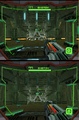 Top: 2x the native resolution without OpenGL.
Bottom: 2x the native resolution with OpenGL -
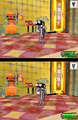 Top: Native software render.
Bottom: 4x the native resolution with OpenGL


External links
[edit | edit source]- The One That Flourished: A Look at melonDS 0.8 (By Dolphin tester JMC47, aka Justin M. Chadwick. 6 June 2019.)
- Official Discord server
- Official forums
- IRC
- Nintendo DS emulators
- Emulators
- Console emulators
- Handheld console emulators
- Windows emulation software
- Linux emulation software
- MacOS emulation software
- BSD emulation software
- Android emulation software
- Switch emulation software
- PlayStation Vita emulation software
- Nintendo DSi emulators
- Active emulation software