Texture filtering: Difference between revisions
| (10 intermediate revisions by the same user not shown) | |||
| Line 63: | Line 63: | ||
==Texture Filtering Algorithms== | ==Texture Filtering Algorithms== | ||
These methods determine how a texture is sampled and displayed on a 3D model. They are generally native to original hardware or | These methods determine how a texture is sampled and displayed on a 3D model in real-time. They are generally native to original hardware or forced via emulator enhancement settings. | ||
{| class="wikitable" style="text-align:center;" | {| class="wikitable" style="text-align:center;" | ||
| Line 72: | Line 72: | ||
|- | |- | ||
|'''Nearest neighbor''' | |'''Nearest neighbor''' | ||
| | |The GPU picks the color of the single closest pixel in the original texture. | ||
| | | | ||
* | * Preserves sharp pixel-art style. | ||
* | * Lowest computational cost. | ||
| | | | ||
* | * Causes "shimmering" or "aliasing" in motion. | ||
* 3D textures look "blocky" up close. | |||
|- | |- | ||
|'''Bilinear''' | |'''Bilinear''' | ||
| | |Averages the color data of the 4 closest pixels to create a smooth transition. | ||
| | | | ||
*Looks better than nearest neighbor for 3D games. | *Looks better than nearest neighbor for 3D games. | ||
*It's the least system-intensive form of texture filtering/scaling. | *It's the least system-intensive form of texture filtering/scaling. | ||
| | | | ||
* | * Can look "blurry," especially on low-resolution textures. | ||
* | * Does not look good for 2D sprites. | ||
|- | |- | ||
|'''Trilinear''' | |'''Trilinear''' | ||
| | |An extension of Bilinear that interpolates between mipmaps (different resolution versions of the same texture). | ||
| | | | ||
* | * Eliminates visible "lines" or "bands" between texture quality levels in the distance. | ||
| | | | ||
* | * Still produces blurriness at sharp viewing angles. | ||
|- | |- | ||
|''' | |'''Anisotropic (AF)''' | ||
| | |Enhances texture quality on surfaces viewed at oblique angles (like floors or walls). | ||
| | | | ||
* | * Drastically improves clarity for distant textures. | ||
* Modern GPUs handle this with almost zero performance loss. | |||
* | |||
| | | | ||
* | * Not available on older legacy hardware. | ||
|} | |} | ||
==Texture Scaling Algorithms== | ==Texture Scaling Algorithms== | ||
{{for|smoothing shaders|Shaders, presets and filters#Smoothing}} | |||
These are enhancement algorithms (often called "upscalers") used by emulators to increase the resolution of textures to look better on modern displays. | These are enhancement algorithms (often called "upscalers") used by emulators to increase the resolution of textures to look better on modern displays. | ||
| Line 177: | Line 177: | ||
*Extremely hardware intensive compared to every other filter on this list; requires a capable GPU. | *Extremely hardware intensive compared to every other filter on this list; requires a capable GPU. | ||
*Can sometimes introduce small "wobbles" or artifacts in very complex, noisy textures where the AI misidentifies an edge. | *Can sometimes introduce small "wobbles" or artifacts in very complex, noisy textures where the AI misidentifies an edge. | ||
|- | |||
|'''ArtCNN''' | |||
|A lightweight Convolutional Neural Network (CNN) designed for real-time upscaling and artifact removal. It uses machine learning to reconstruct sharp edges and smooth gradients. | |||
| | |||
*Produces some of the cleanest results for 2D art and UI elements. | |||
*Excellent at removing "ringing" and compression artifacts that other scalers might amplify. | |||
*Provides a much more natural, "hand-drawn" look compared to the "oil painting" effect of xBRZ. | |||
*Highly optimized; much faster than NNEDI3 while providing similar or better visual clarity. | |||
| | |||
*Requires a GPU that supports modern shader languages (Vulkan/GLSL/HLSL). | |||
*Can occasionally "over-clean" textures, removing intentional film grain or fine grit in 3D textures. | |||
*May be too demanding for very low-end integrated graphics or older mobile devices. | |||
|} | |} | ||
==Durante's | ==Emulator Specific== | ||
These are specific options found in emulators like [[PPSSPP]] that modify or combine the methods listed above to achieve better results. PPSSPP has a scaling option known as "Hybrid." There's also an option called "Deposterize." Posterization, meaning a sharp contrast in hue from one pixel to another (very common in low-quality gifs) has been a problem plaguing texture scaling algorithms for quite some time. Durante's filter switches between xBR and bilinear/bicubic filtering depending on the texture information. On top of this, the "Deposterize" option tackles posterization edges in compressed textures, allowing for a smooth gradient rather than a sharp transition. Although it's not perfect (a perfect scaler sadly isn't possible with today's computing power) it's still great and it's recommended to use for PPSSPP if you have the specs. | |||
{| class="wikitable" style="text-align:center;" | |||
! scope="col"|Feature | |||
! scope="col"|What it does | |||
! scope="col"|Pros | |||
! scope="col"|Cons | |||
|- | |||
|'''Hybrid / Hybrid + Bicubic''' | |||
|A scaling method that switches between xBR and bilinear/bicubic filtering depending on the texture information. It attempts to detect which parts of a texture need sharp edge enhancement and which are smooth gradients. | |||
| | |||
*The "best of both worlds": preserves sharp edges where needed while keeping smooth areas (like skies) from looking blocky or "posterized." | |||
*Generally considered the "Gold Standard" for a balanced look in PPSSPP if the hardware can handle it. | |||
| | |||
*Highly system-intensive. | |||
*While it aims for a perfect balance, a perfect scaler isn't possible with today's computing power, so some textures may still look slightly inconsistent. | |||
|- | |||
|'''Deposterize''' | |||
|A filter that tackles "posterization" (sharp, ugly jumps in color hue common in compressed textures) by smoothing out the transitions into a natural gradient. | |||
| | |||
*Allows for a smooth gradient rather than a sharp, blocky transition in colors. | |||
*Greatly reduces the "oil painting" artifacts that often plague other texture scaling algorithms. | |||
*Highly recommended for use in PPSSPP if you have the specs to support it. | |||
| | |||
*Can occasionally "wash out" textures where sharp color transitions were an intentional part of the art style. | |||
*Adds extra load to the GPU when combined with high-level scalers. | |||
|} | |||
==Images== | ==Images== | ||
| Line 203: | Line 240: | ||
==Texture filtering hacks== | ==Texture filtering hacks== | ||
Some emulators features better texture filtering: enhancement option for providing better texture filtering methods comparing the original hardware had. See [[Wii emulators#Enhancements]] | Some emulators features better texture filtering: enhancement option for providing better texture filtering methods comparing the original hardware had. | ||
See; | |||
*[[Wii emulators#Enhancements]] | |||
*[[GameCube emulators#Enhancements]] | |||
*[[Dreamcast emulators#Enhancements]] | |||
*[[Nintendo 64 emulators#Enhancements]] | |||
*[[PlayStation 2 emulators#Enhancements]] | |||
*[[Xbox emulators#Enhancements]] | |||
*[[Nintendo DS emulators#Enhancements]] | |||
*[[PlayStation Portable emulators#Enhancements]] | |||
sections. | |||
==Framebuffer Scaling & Output Methods== | |||
{{Main|Scaling}} | |||
==Further reading== | ==Further reading== | ||
| Line 210: | Line 260: | ||
* [https://casual-effects.com/research/McGuire2021PixelArt/index.html The original academic paper explaining the MMPX algorithm] (Warning: This is very dense and contains a great deal of jargon) | * [https://casual-effects.com/research/McGuire2021PixelArt/index.html The original academic paper explaining the MMPX algorithm] (Warning: This is very dense and contains a great deal of jargon) | ||
* [https://dolphin-emu.org/blog/2025/06/04/dolphin-progress-report-release-2506/#2503-122-use-game-requested-anisotropic-filtering-by-pokechu22-and-billiard Use Game Requested Anisotropic Filtering - Dolphin blog 2025/06/04] | * [https://dolphin-emu.org/blog/2025/06/04/dolphin-progress-report-release-2506/#2503-122-use-game-requested-anisotropic-filtering-by-pokechu22-and-billiard Use Game Requested Anisotropic Filtering - Dolphin blog 2025/06/04] | ||
* [https://github.com/hrydgard/ppsspp/pull/21527 PPSSPP PR: #21527 - NNEDI3 and Spline36 GPU texture scaling] | |||
[[Category:FAQs]] | [[Category:FAQs]] | ||
Latest revision as of 17:56, 8 June 2026

- This article is about smoothing techniques that may be present even on original hardware. For the process of replacing textures to improve their visual fidelity or other aesthetic reasons, see Texture Packs.
Texture filtering refers to the methods used to smooth the textures of a 3D model. Every home console after the Nintendo 64 is able to do it, including every modern PC and Android device. This makes it useful in emulation, where it can be applied to emulators for consoles that did not originally have it through various emulators that support it.
| Console | Texture Filtering | Types of filtering |
|---|---|---|
| Super Nintendo | ✗ | |
| 3DO | ✗ | ? |
| Atari Jaguar | ✗ | |
| Sega Saturn | ✗ | |
| PlayStation | ✗ | |
| Nintendo 64 | ✓ | Three-sample |
| Sega Dreamcast | ✓ | Bilinear, trilinear, anisotropic |
| PlayStation 2 | ✓ | Bilinear, trilinear, Anisotropic |
| GameCube | ✓ | Bilinear, trilinear, anisotropic |
| Xbox | ✓ | Bilinear, trilinear, anisotropic |
| Nintendo DS | ✗ | ? |
| PlayStation Portable | ✓ | Bilinear, trilinear |
| Wii | ✓ | Bilinear, trilinear, anisotropic |
Texture Filtering Algorithms
[edit | edit source]These methods determine how a texture is sampled and displayed on a 3D model in real-time. They are generally native to original hardware or forced via emulator enhancement settings.
| Filtering type | What it does | Pros | Cons |
|---|---|---|---|
| Nearest neighbor | The GPU picks the color of the single closest pixel in the original texture. |
|
|
| Bilinear | Averages the color data of the 4 closest pixels to create a smooth transition. |
|
|
| Trilinear | An extension of Bilinear that interpolates between mipmaps (different resolution versions of the same texture). |
|
|
| Anisotropic (AF) | Enhances texture quality on surfaces viewed at oblique angles (like floors or walls). |
|
|
Texture Scaling Algorithms
[edit | edit source]- For smoothing shaders, see Shaders, presets and filters#Smoothing.
These are enhancement algorithms (often called "upscalers") used by emulators to increase the resolution of textures to look better on modern displays.
| Scaling Algorithm | What it does | Pros | Cons |
|---|---|---|---|
| HQx | A texture scaling algorithm. Scales up a nearest-neighbor version of the texture and fills in the gaps with copies of the pixels next to said gaps. |
|
|
| 2xSaI | A texture scaling algorithm. Scales the texture and fills edges in with a mixture of pixels taken from the source and randomly-guessed colors. |
|
|
| xBR | A modified version of HQx. It detects edges better, which works better for curved lines, or for slopes that are greater than/less than 45 degrees. |
|
|
| xBRZ | A modified version of xBR, which is very similar except it's better at scaling up smaller features consisting of <10 pixels. |
|
|
| MMPX | A texture scaling algorithm. Provides a nearly unfiltered, "Retro Plus" pixel art aesthetic with better handling of rounded and diagonal edges, similar to that found in many indie games. |
|
|
| NNEDI3 | A neural network-based "edge-directed" interpolator. It uses a pre-trained model to predict what missing pixels should look like based on existing edges and structures. |
|
|
| ArtCNN | A lightweight Convolutional Neural Network (CNN) designed for real-time upscaling and artifact removal. It uses machine learning to reconstruct sharp edges and smooth gradients. |
|
|
Emulator Specific
[edit | edit source]These are specific options found in emulators like PPSSPP that modify or combine the methods listed above to achieve better results. PPSSPP has a scaling option known as "Hybrid." There's also an option called "Deposterize." Posterization, meaning a sharp contrast in hue from one pixel to another (very common in low-quality gifs) has been a problem plaguing texture scaling algorithms for quite some time. Durante's filter switches between xBR and bilinear/bicubic filtering depending on the texture information. On top of this, the "Deposterize" option tackles posterization edges in compressed textures, allowing for a smooth gradient rather than a sharp transition. Although it's not perfect (a perfect scaler sadly isn't possible with today's computing power) it's still great and it's recommended to use for PPSSPP if you have the specs.
| Feature | What it does | Pros | Cons |
|---|---|---|---|
| Hybrid / Hybrid + Bicubic | A scaling method that switches between xBR and bilinear/bicubic filtering depending on the texture information. It attempts to detect which parts of a texture need sharp edge enhancement and which are smooth gradients. |
|
|
| Deposterize | A filter that tackles "posterization" (sharp, ugly jumps in color hue common in compressed textures) by smoothing out the transitions into a natural gradient. |
|
|
Images
[edit | edit source]-
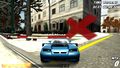 PSP game with linear filtering
 -
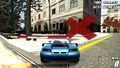 PSP game with nearest neighbor
 -
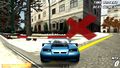 PSP game with 3xBR texture scaling


-
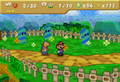 N64 game at native internal resolution (using SoftGraphic plugin)
 -
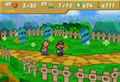 N64 game upscaled with bilinear filtering (using Glide64 plugin)
 -
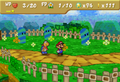 N64 game upscaled with nearest neighbor (using Glide64 plugin)


-
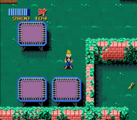 SNES game with nearest neighbor
 -
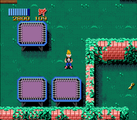 SNES game with linear filtering


-
 SNES game with nearest neighbor
 -
 SNES game with HQ4x texture scaling
 -
 SNES game with 5xBR texture scaling


Texture filtering hacks
[edit | edit source]Some emulators features better texture filtering: enhancement option for providing better texture filtering methods comparing the original hardware had. See;
- Wii emulators#Enhancements
- GameCube emulators#Enhancements
- Dreamcast emulators#Enhancements
- Nintendo 64 emulators#Enhancements
- PlayStation 2 emulators#Enhancements
- Xbox emulators#Enhancements
- Nintendo DS emulators#Enhancements
- PlayStation Portable emulators#Enhancements
sections.
Framebuffer Scaling & Output Methods
[edit | edit source]- Main article: Scaling
Further reading
[edit | edit source]- Forum post from the creator of xBR, explaining how the algorithm works (Warning: is slightly hard to read due to the amount of jargon and big words)
- A blog entry by Durante on creating a hybrid texture filter for PPSSPP.
- The original academic paper explaining the MMPX algorithm (Warning: This is very dense and contains a great deal of jargon)
- Use Game Requested Anisotropic Filtering - Dolphin blog 2025/06/04
- PPSSPP PR: #21527 - NNEDI3 and Spline36 GPU texture scaling