Texture filtering: Difference between revisions
No edit summary |
|||
| Line 171: | Line 171: | ||
Super_Mario_All-Stars_with_5xBR.png|SNES game with 5xBR texture scaling | Super_Mario_All-Stars_with_5xBR.png|SNES game with 5xBR texture scaling | ||
</gallery> | </gallery> | ||
==Texture filtering hacks== | |||
Some emulators features better texture filtering: enhancement option for providing better texture filtering methods comparing the original hardware had. See [[Wii emulators#Enhancements]], [[GameCube emulators#Enhancements]], [[Dreamcast emulators#Enhancements]], [[Nintendo 64 emulators#Enhancements]], [[PlayStation 2 emulators#Enhancements]], [[Xbox emulators#Enhancements]], [[Nintendo DS emulators#Enhancements]] and [[PlayStation Portable emulators#Enhancements]]. | |||
==Further reading== | ==Further reading== | ||
Revision as of 16:09, 26 November 2025

- This article is about smoothing techniques that may be present even on original hardware. For the process of replacing textures to improve their visual fidelity or other aesthetic reasons, see Texture Packs.
Texture filtering refers to the methods used to smooth the textures of a 3D model. Every home console after the Nintendo 64 is able to do it, including every modern PC and Android device. This makes it useful in emulation, where it can be applied to emulators for consoles that did not originally have it through various emulators that support it.
Consoles
| Console | Texture Filtering | Types of filtering |
|---|---|---|
| Super Nintendo | ✗ | |
| 3DO | ✗ | ? |
| Atari Jaguar | ✗ | |
| Sega Saturn | ✗ | |
| PlayStation | ✗ | |
| Nintendo 64 | ✓ | Three-sample |
| Sega Dreamcast | ✓ | Bilinear, trilinear, anisotropic |
| PlayStation 2 | ✓ | Bilinear, trilinear, Anisotropic |
| GameCube | ✓ | Bilinear, trilinear, anisotropic |
| Xbox | ✓ | Bilinear, trilinear, anisotropic |
| Nintendo DS | ✗ | ? |
| PlayStation Portable | ✓ | Bilinear, trilinear |
| Wii | ✓ | Bilinear, trilinear, anisotropic |
Types of Texture Filtering
| Filtering type | What it does | Pros | Cons |
|---|---|---|---|
| Nearest neighbor | This method sorts pixels into the nearest place relevant to its placement in the original resolution, in order to display the image at whatever resolution you specify. |
|
|
| Bilinear | This linear filtering method uses color data from the pixels in a nearest-neighbor texture, and combines multiple bits of color data in order to replace some of the pixels with an averaged-out version of the colors, so that the colors gradually switch rather than jump to a new color. |
|
|
| Trilinear | This linear filtering method does the same thing as bilinear filtering, but additionally interpolates between mipmaps (downscaled versions of the texture used for far away objects), thereby preventing mipmap banding (harsh transitions between mipmap levels). |
|
|
| HQx | A texture scaling algorithm. Scales up a nearest-neighbor version of the texture and fills in the gaps with copies of the pixels next to said gaps. |
|
|
| 2xSaI | A texture scaling algorithm. Scales the texture and fills edges in with a mixture of pixels taken from the source and randomly-guessed colors. |
|
|
| xBR | A modified version of HQx. It detects edges better, which works better for curved lines, or for slopes that are greater than/less than 45 degrees. |
|
|
| xBRZ | A modified version of xBR, which is very similar except it's better at scaling up smaller features consisting of <10 pixels. |
|
|
| MMPX | A texture scaling algorithm. Provides a nearly unfiltered, "Retro Plus" pixel art aesthetic with better handling of rounded and diagonal edges, similar to that found in many indie games. |
|
|
Durante's Hybrid and Deposterization Filters for PPSSPP
PPSSPP has a scaling option known as "Hybrid." There's also an option called "Deposterize." Posterization, meaning a sharp contrast in hue from one pixel to another (very common in low-quality gifs) has been a problem plaguing texture scaling algorithms for quite some time. Durante's filter switches between xBR and bilinear/bicubic filtering depending on the texture information. On top of this, the "Deposterize" option tackles posterization edges in compressed textures, allowing for a smooth gradient rather than a sharp transition. Although it's not perfect (a perfect scaler sadly isn't possible with today's computing power) it's still great and it's recommended to use for PPSSPP if you have the specs.
Images
-
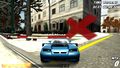 PSP game with linear filtering
 -
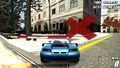 PSP game with nearest neighbor
 -
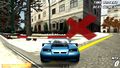 PSP game with 3xBR texture scaling


-
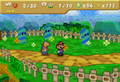 N64 game at native internal resolution (using SoftGraphic plugin)
 -
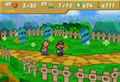 N64 game upscaled with bilinear filtering (using Glide64 plugin)
 -
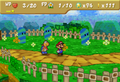 N64 game upscaled with nearest neighbor (using Glide64 plugin)


-
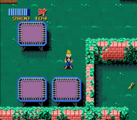 SNES game with nearest neighbor
 -
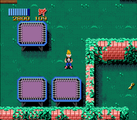 SNES game with linear filtering


-
 SNES game with nearest neighbor
 -
 SNES game with HQ4x texture scaling
 -
 SNES game with 5xBR texture scaling


Texture filtering hacks
Some emulators features better texture filtering: enhancement option for providing better texture filtering methods comparing the original hardware had. See Wii emulators#Enhancements, GameCube emulators#Enhancements, Dreamcast emulators#Enhancements, Nintendo 64 emulators#Enhancements, PlayStation 2 emulators#Enhancements, Xbox emulators#Enhancements, Nintendo DS emulators#Enhancements and PlayStation Portable emulators#Enhancements.
Further reading
- Forum post from the creator of xBR, explaining how the algorithm works (Warning: is slightly hard to read due to the amount of jargon and big words)
- A blog entry by Durante on creating a hybrid texture filter for PPSSPP.
- The original academic paper explaining the MMPX algorithm (Warning: This is very dense and contains a great deal of jargon)
- Use Game Requested Anisotropic Filtering - Dolphin blog 2025/06/04